> ## Documentation Index
> Fetch the complete documentation index at: https://docs.zencoder.ai/llms.txt
> Use this file to discover all available pages before exploring further.
# Skills
> Create, manage, and use agent skills in Zenflow — reusable instruction packages that extend agent capabilities.
## Overview
Skills are reusable instruction packages that give agents domain expertise, specialized workflows, and organizational knowledge. In Zenflow, skills are managed through **Settings → Prompts & Skills** and are accessible via the `/` command in chat and task descriptions.
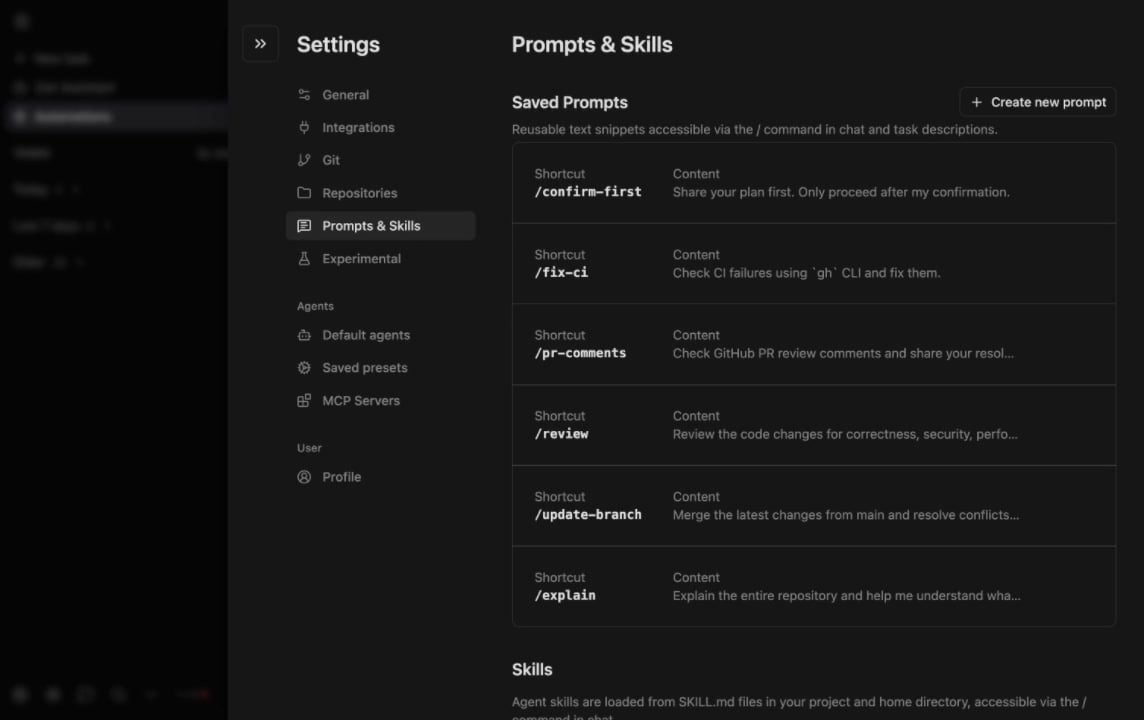
Skills are loaded from `SKILL.md` files in your project and home directory, accessible via the `/` command in chat.
## How Skills Work
Zencoder automatically discovers skills from these locations:
| Location | Scope |
| ----------------------------- | --------------------------------------------- |
| `/.agents/skills/` | Project-specific skills shared with the team |
| `/.agents/skills/` | Personal skills available across all projects |
| `/.claude/skills/` | Claude-compatible skills |
The agent matches skills to tasks based on the skill's description. When a skill matches, its instructions are loaded into the agent's context automatically.
## Creating a Skill
Create a folder inside `.agents/skills/` in your project:
```
.agents/skills/
└── my-skill/
├── SKILL.md
├── scripts/
└── resources/
```
Add metadata and instructions:
```markdown theme={"system"}
---
name: Code Review Assistant
description: Helps perform thorough code reviews following team standards
---
# Code Review Assistant
## Instructions
When reviewing code, follow these steps:
1. Check for security vulnerabilities
2. Verify error handling patterns
3. Ensure test coverage requirements are met
```
The skill appears in the `/` menu in any chat or task description. The agent also auto-selects it when the task context matches the skill's description.
## SKILL.md Reference
| Field | Required | Description |
| -------------------------- | -------- | ------------------------------------------------------------------------ |
| `name` | Yes | Human-readable name for the skill |
| `description` | Yes | Trigger condition — the agent uses this to decide when to load the skill |
| `paths` | No | Glob patterns to scope the skill to specific files (e.g., `src/api/**`) |
| `disable-model-invocation` | No | Set to `true` to prevent auto-selection |
Write the `description` as a clear trigger condition. "Use when the user asks to create or modify API endpoints" is more effective than "API helper skill."
## Example Skills
Enforces your team's review standards on every code review.
```markdown theme={"system"}
---
name: PR Review Checklist
description: Use when reviewing pull requests or performing code reviews
---
# PR Review Checklist
## Instructions
When reviewing code changes:
1. Check for security vulnerabilities (SQL injection, XSS, auth bypasses)
2. Verify error handling — all async calls should have try/catch
3. Ensure new functions have corresponding unit tests
4. Flag any hardcoded secrets, API keys, or credentials
5. Check that naming conventions match the project's standards
6. Verify backward compatibility for public API changes
```
Generates migration files following your ORM's conventions.
```markdown theme={"system"}
---
name: Database Migration Generator
description: Use when creating database migrations, schema changes, or model updates
paths:
- src/db/**
- prisma/**
---
# Database Migration Generator
## Instructions
When generating migrations:
1. Use the project's ORM (check for Prisma, Drizzle, or TypeORM)
2. Always create both up and down migrations
3. Add data backfill scripts when renaming or removing columns
4. Include an index for any new foreign key column
5. Name migration files with timestamp prefix: YYYYMMDDHHMMSS_description
```
Creates REST endpoints following your team's patterns.
```markdown theme={"system"}
---
name: API Endpoint Builder
description: Use when creating new API routes, endpoints, or controllers
paths:
- src/api/**
- src/routes/**
---
# API Endpoint Builder
## Instructions
When creating API endpoints:
1. Follow the existing route structure in src/api/
2. Include input validation using the project's validation library
3. Add OpenAPI/Swagger annotations for documentation
4. Create corresponding integration tests in __tests__/api/
5. Use the standard error response format: { error: string, code: number }
6. Add rate limiting middleware for public endpoints
```
## Built-In Orchestration Skills
Zenflow includes built-in skills for [multi-agent orchestration](/zenflow/multi-agent-orchestration):
| Skill | Purpose |
| ----------------------------- | -------------------------------------------------------- |
| `zenflow-planner` | Produces a structured implementation plan artifact |
| `zenflow-implementer` | Executes a plan from an artifact file |
| `zenflow-review-orchestrator` | Spawns parallel review workers and consolidates findings |
| `zenflow-review-worker` | Single-model review; called by the orchestrator |
| `comprehensive-review` | Multi-model code review via subagents |
## Skills vs Saved Prompts
| | Skills | Saved Prompts |
| -------------------- | ---------------------------------------------------------------- | -------------------------------------- |
| **What it is** | Instruction package with metadata, scripts, and resources | Reusable text snippet |
| **How it activates** | Auto-selected by agent based on task context, or via `/` command | Manual via `/` command only |
| **Best for** | Domain expertise, multi-step workflows, team standards | Repeated instructions, common requests |
| **Stored in** | `.agents/skills/` (version-controlled) | Zenflow Settings |
## Next Steps
Full skill specification, advanced features, and IDE integration
Create reusable prompt shortcuts