> ## Documentation Index
> Fetch the complete documentation index at: https://docs.zencoder.ai/llms.txt
> Use this file to discover all available pages before exploring further.
# Agent Presets
> Define named model configurations and assign them to workflow steps for sequential multi-model execution.
## What Are Agent Presets?
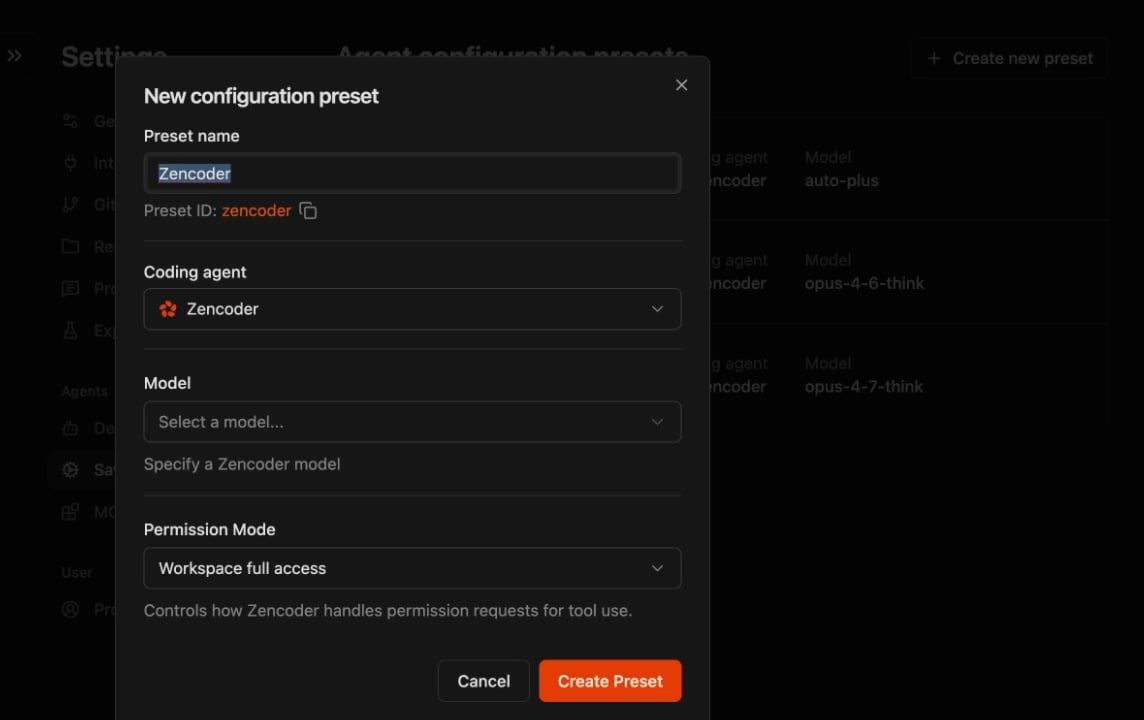
Agent presets are named model configurations stored in **Settings → Saved presets**. Each preset defines:
* **Coding agent** — which runtime to use (Zencoder, Claude Code, Codex, Gemini)
* **Model** — which model the agent uses (e.g., Claude Opus, Gemini Flash, Claude Sonnet)
* **Permission Mode** — execution mode and tool access level
You can create multiple presets — for example, `opus-planner`, `flash-builder`, `sonnet-reviewer` — and assign them to different workflow steps.
## Assigning Presets to Workflow Steps
In a [custom workflow](/zenflow/workflows/custom) file (`.zenflow/workflows/`), use the `` comment to bind a preset to a specific step:
```md theme={"system"}
# Multi-Agent Feature Workflow
## Configuration
- **Artifacts Path**: {@artifacts_path} → `.zenflow/worktrees/{task_id}`
---
## Workflow Steps
### [ ] Step: Planning
Analyze the task requirements. Produce a technical specification in `{@artifacts_path}/spec.md` covering:
- Architecture decisions and trade-offs
- Affected files and modules
- Edge cases and error handling
- Verification criteria
### [ ] Step: Implementation
Implement the changes described in `{@artifacts_path}/spec.md`. Follow the project's existing patterns and conventions.
- Write code that satisfies the spec
- Include unit tests for new logic
- Update `{@artifacts_path}/plan.md` with completed items
### [ ] Step: Review
Review all changes from the Implementation step against `{@artifacts_path}/spec.md`.
- Check for correctness, edge cases, and regression risks
- Verify scope discipline — no unnecessary changes
- Confirm tests cover the new behavior
- Record findings in `{@artifacts_path}/review.md`
```
When the task runs, Zenflow automatically switches to the assigned preset at each step boundary.
## Sequential Multi-Model Review
For higher-stakes changes, add multiple review steps — each runs after the previous one, so each reviewer sees the last reviewer's output:
```md theme={"system"}
### [ ] Step: Review — Architecture (Claude Opus)
Deep review of architectural decisions, contract adherence, and regression risks.
Record findings in `{@artifacts_path}/review-architecture.md`.
### [ ] Step: Review — Implementation (Claude Sonnet)
Implementation-level review: code quality, test coverage, scope discipline.
Record findings in `{@artifacts_path}/review-implementation.md`.
```
## Default Agents
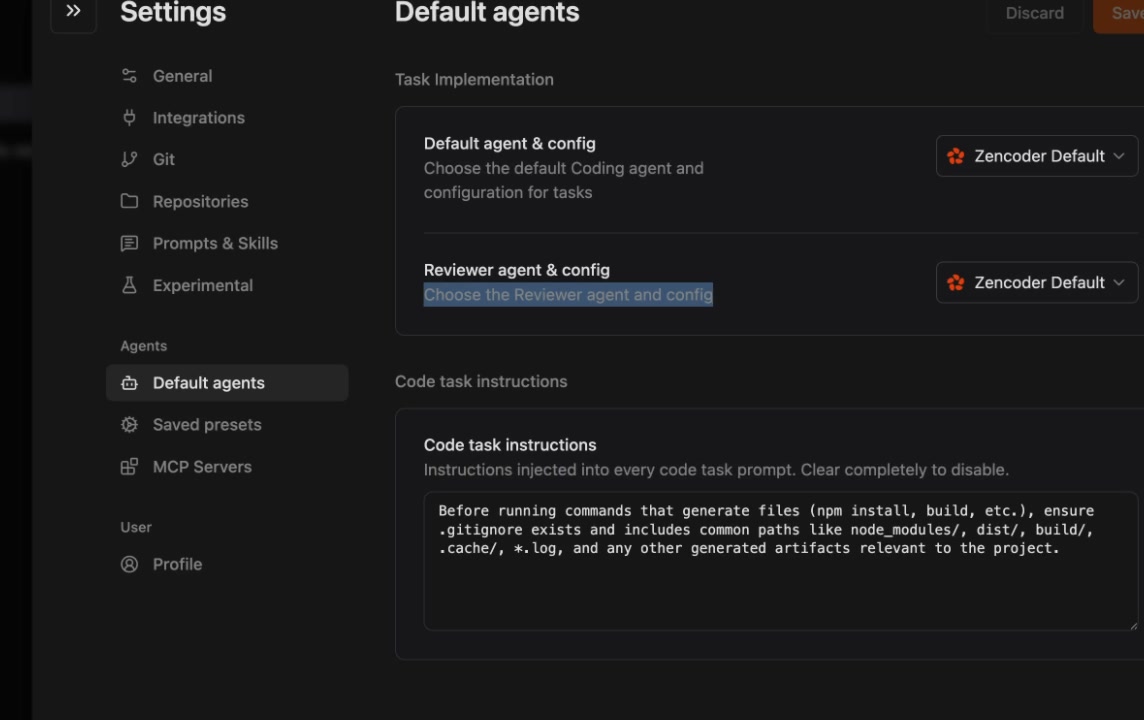
Configure the default agent preset for all new tasks in **Settings → Default agents**:
| Setting | Description |
| --------------------------- | ------------------------------------------------- |
| **Default agent & config** | The preset used for new task implementation |
| **Reviewer agent & config** | The preset used for review steps |
| **Code task instructions** | Instructions injected into every code task prompt |
## When to Use Presets
| Scenario | Fit |
| -------------------------------------------------- | --------------------------------------------------------------------------- |
| Sequential workflow steps with different models | Best fit |
| Recurring workflows reused across tasks | Best fit |
| Need parallel execution within a phase | Use [Subagent Pipelines](/zenflow/orchestration/subagent-pipelines) instead |
| Want model assignments in the workflow file itself | Use [Subagent Pipelines](/zenflow/orchestration/subagent-pipelines) instead |