> ## Documentation Index
> Fetch the complete documentation index at: https://docs.zencoder.ai/llms.txt
> Use this file to discover all available pages before exploring further.
# Engineering Managers
> Put team metrics, PR health, and sprint pulse tracking on autopilot with the Engineering Manager Dashboard automation.
## Overview
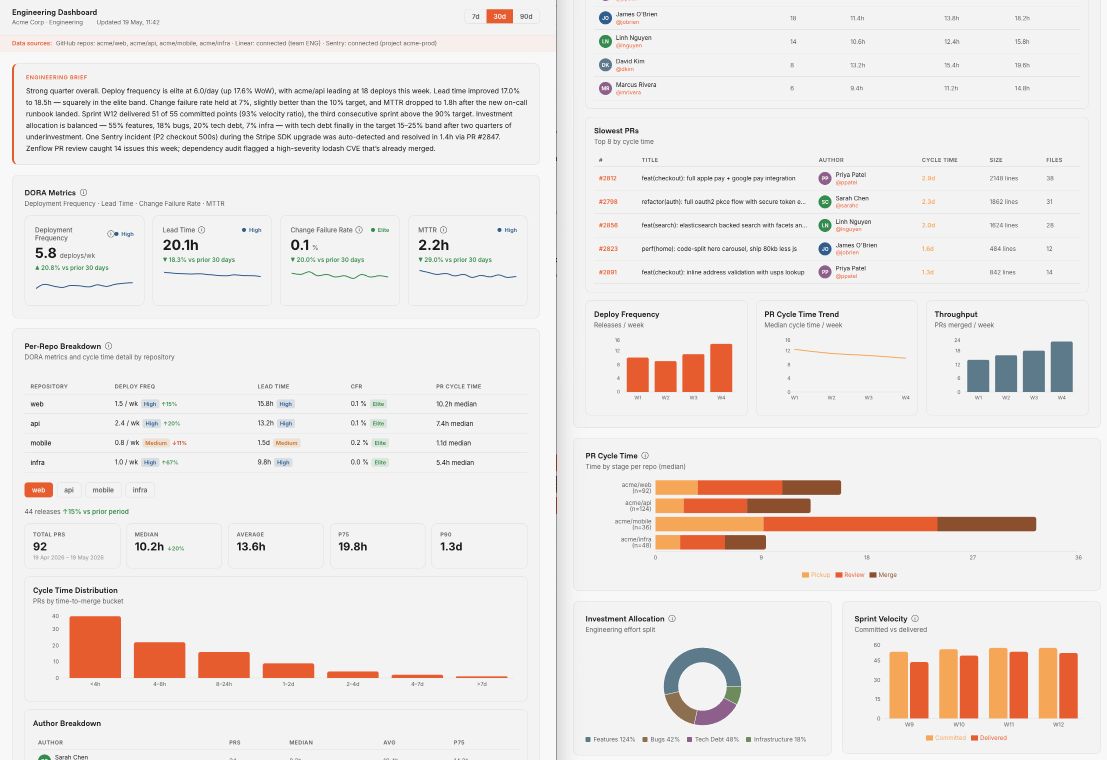 The **Engineering Manager Dashboard** automation helps engineering leaders stay on top of team progress without manual manual status compilation. This scheduled automation pulls real-time data from your development and tracking systems (such as GitHub, Linear, Jira, and Sentry) to generate a comprehensive daily report of sprint health, PR cycles, and production stability.
With this automation active, Zenflow automatically spawns a background agent task every morning to query engineering metrics, compile team-wide progress, and publish a live-rendered HTML dashboard directly in your workspace.
***
## How It Works
This workspace automation executes according to your configured schedule (typically every weekday morning) and follows a structured execution pipeline:
At the configured execution time, Zenflow launches a standalone task titled `Run Engineering Manager Dashboard` using the **Auto** workflow.
The agent searches for the globally installed `engineering-manager` skill across standard agent execution paths on the host machine.
If the skill is not found, the agent automatically installs it globally using the Zencoder package registry, ensuring zero-configuration execution.
The agent reads the loaded skill specification, executes the underlying DORA metrics, sprint pulse, and Jira/Linear queries, and compiles the live dashboard report.
***
## How to Install & Configure
Setting up the Engineering Manager Dashboard is straightforward. You can configure it from scratch or initialize it using the pre-built template in Zenflow.
### Quick Start with Templates
1. Open **Zenflow** and click the **thunderbolt icon** in the left sidebar to navigate to the **Automations** view.
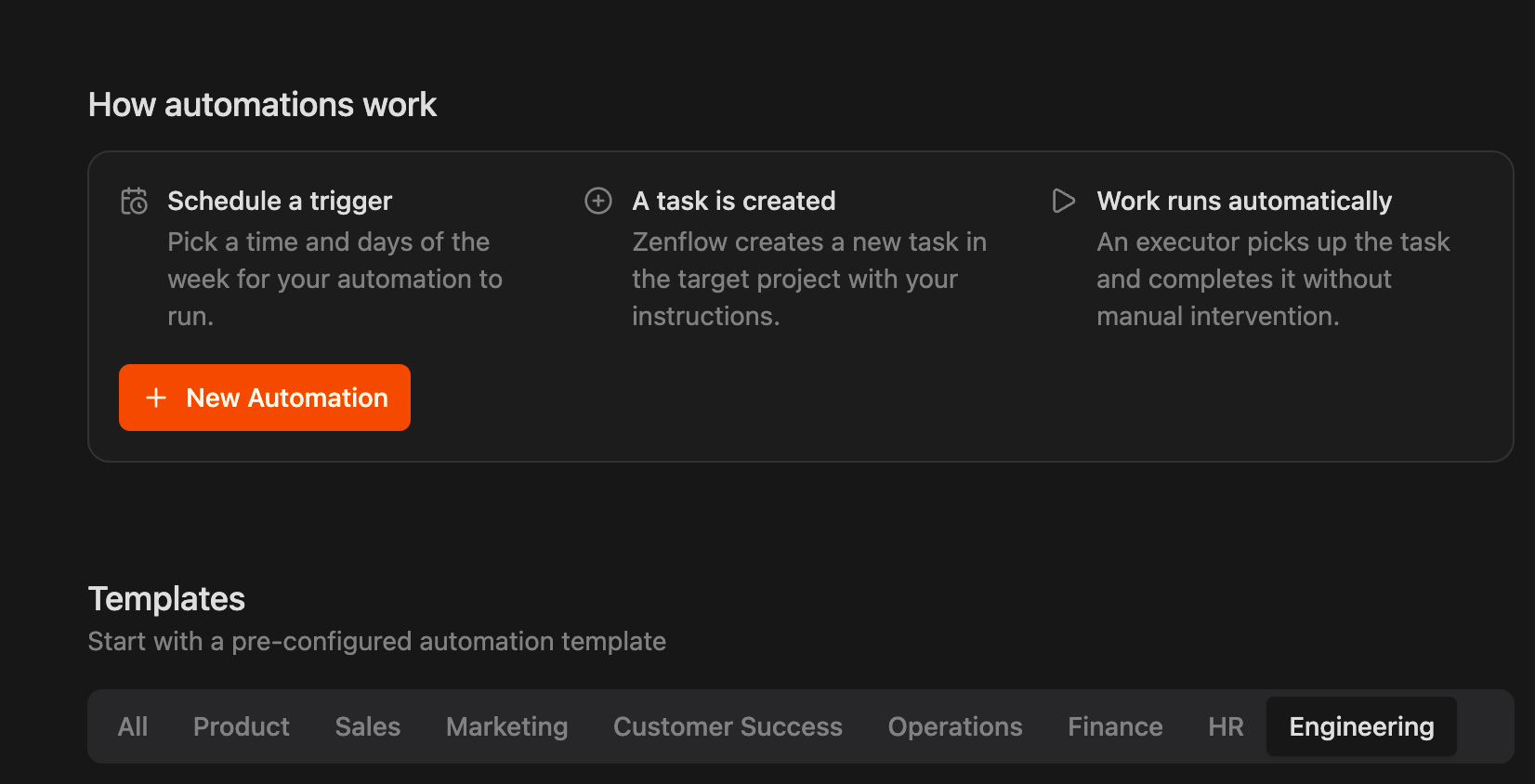
2. Scroll to the **Templates** section at the bottom of the page and click the **Engineering** tab.
The **Engineering Manager Dashboard** automation helps engineering leaders stay on top of team progress without manual manual status compilation. This scheduled automation pulls real-time data from your development and tracking systems (such as GitHub, Linear, Jira, and Sentry) to generate a comprehensive daily report of sprint health, PR cycles, and production stability.
With this automation active, Zenflow automatically spawns a background agent task every morning to query engineering metrics, compile team-wide progress, and publish a live-rendered HTML dashboard directly in your workspace.
***
## How It Works
This workspace automation executes according to your configured schedule (typically every weekday morning) and follows a structured execution pipeline:
At the configured execution time, Zenflow launches a standalone task titled `Run Engineering Manager Dashboard` using the **Auto** workflow.
The agent searches for the globally installed `engineering-manager` skill across standard agent execution paths on the host machine.
If the skill is not found, the agent automatically installs it globally using the Zencoder package registry, ensuring zero-configuration execution.
The agent reads the loaded skill specification, executes the underlying DORA metrics, sprint pulse, and Jira/Linear queries, and compiles the live dashboard report.
***
## How to Install & Configure
Setting up the Engineering Manager Dashboard is straightforward. You can configure it from scratch or initialize it using the pre-built template in Zenflow.
### Quick Start with Templates
1. Open **Zenflow** and click the **thunderbolt icon** in the left sidebar to navigate to the **Automations** view.
2. Scroll to the **Templates** section at the bottom of the page and click the **Engineering** tab.
 3. Locate the **Engineering Manager Dashboard** card.
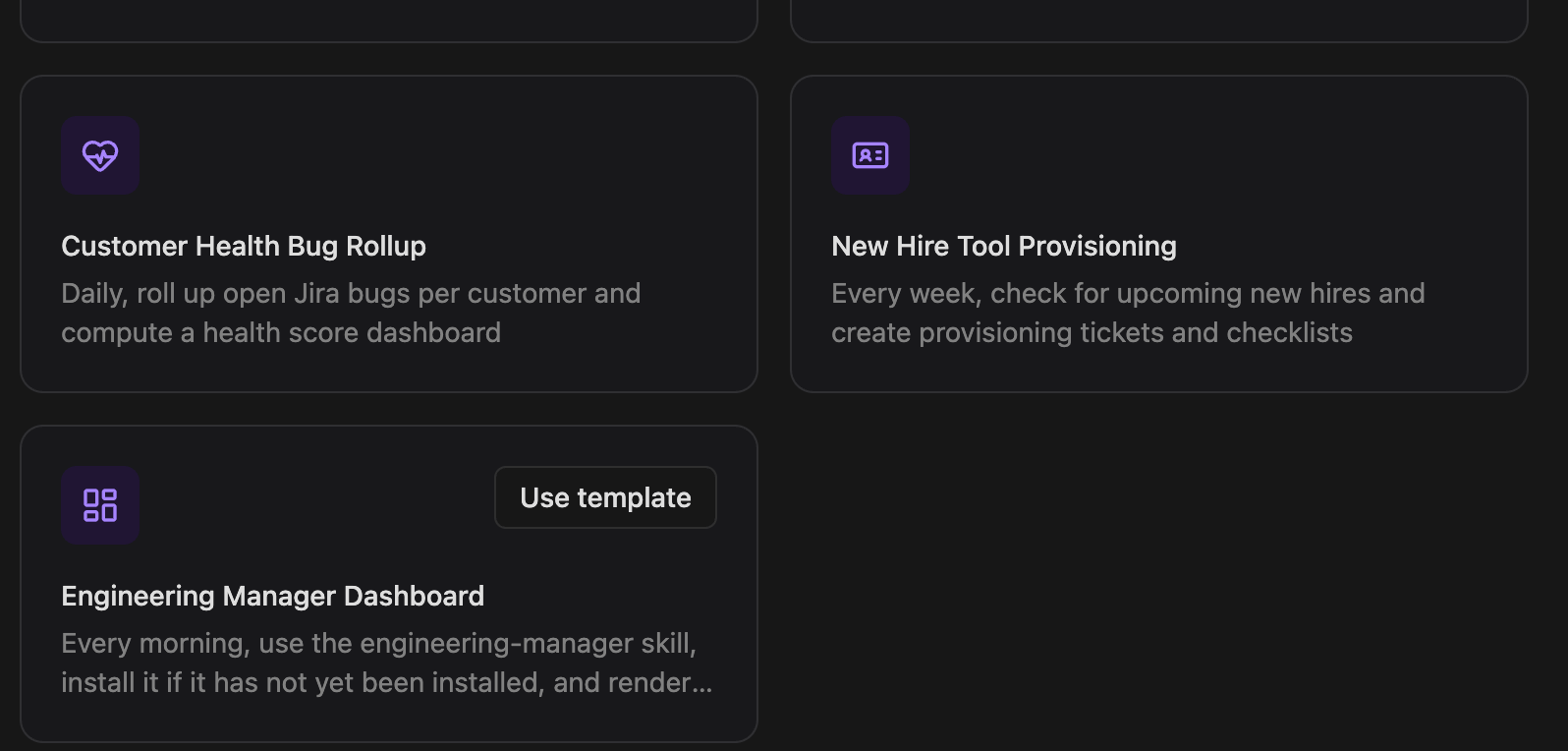 4. Click **Use template**.
5. Customize the schedule, target workspace, and execution settings in the modal dialog, and click **Create**.
### Custom Installation Details
When creating or modifying the automation, the underlying execution flow is configured as follows:
4. Click **Use template**.
5. Customize the schedule, target workspace, and execution settings in the modal dialog, and click **Create**.
### Custom Installation Details
When creating or modifying the automation, the underlying execution flow is configured as follows:
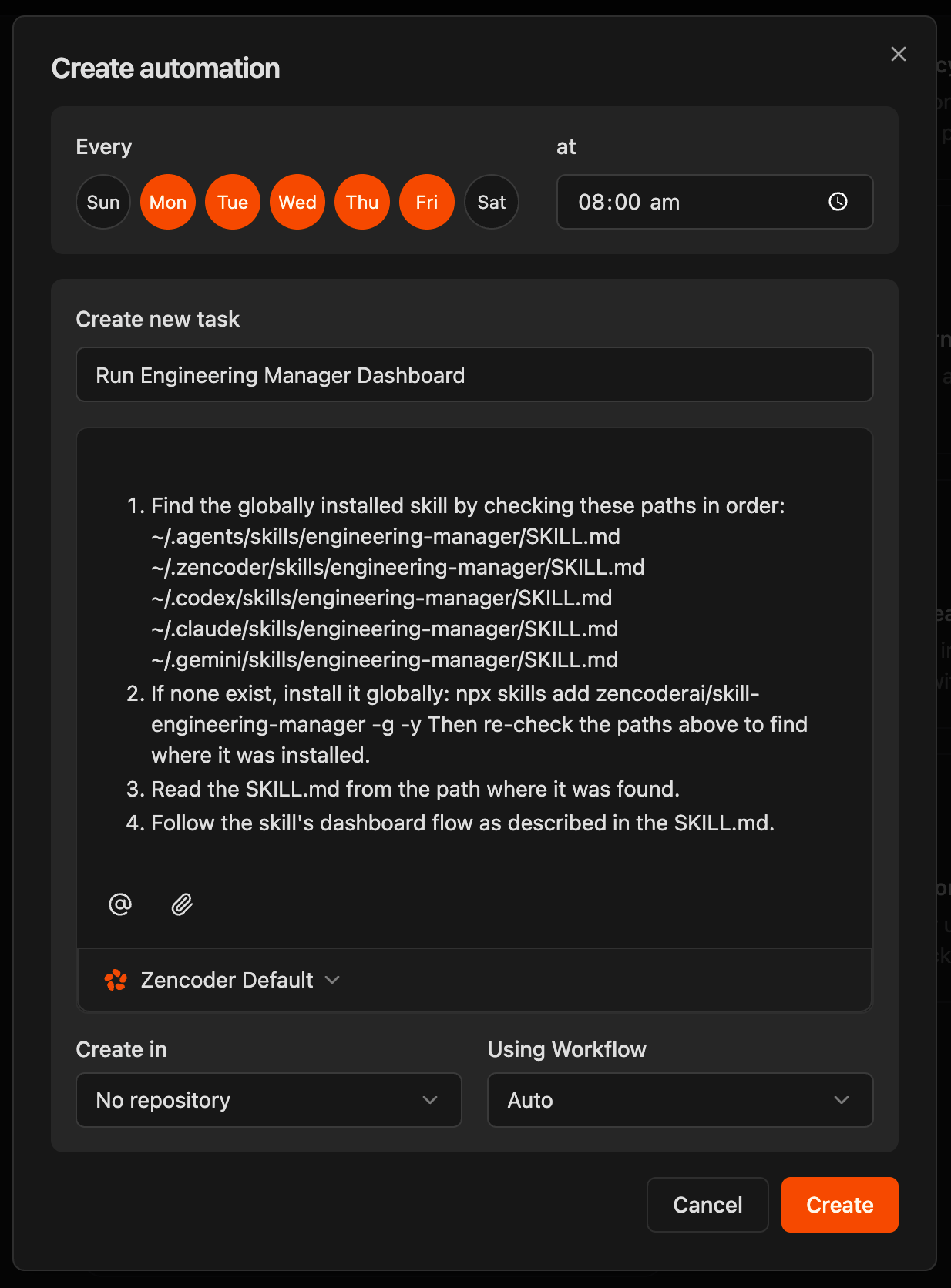 When the automation executes, the agent follows these explicit technical instructions:
The agent checks for a globally installed skill by verifying the following local paths in order:
* `~/.agents/skills/engineering-manager/SKILL.md`
* `~/.zencoder/skills/engineering-manager/SKILL.md`
* `~/.codex/skills/engineering-manager/SKILL.md`
* `~/.claude/skills/engineering-manager/SKILL.md`
* `~/.gemini/skills/engineering-manager/SKILL.md`
If the skill is not present in any of the checked paths, the agent automatically triggers a global installation:
```bash theme={"system"}
npx skills add zencoderai/skill-engineering-manager -g -y
```
Once the command completes, the agent re-scans the directories to locate the newly installed `SKILL.md` file.
The agent reads and parses the `SKILL.md` file from the identified path to initialize the specialized prompts, workflows, and execution context.
The agent executes the dashboard generation sequence outlined in the skill, compiling:
* **PR Health**: Analysis of open pull requests, review cycle times, and staleness
* **Sprint Pulse**: Updates on active sprint progress from Linear or Jira
* **DORA Metrics**: Investment allocation and deployment frequency
* **Sentry Alerts**: Unresolved critical production exceptions
***
## Recommended Configuration
For the best results, we recommend setting up the automation with the following default parameters:
| Configuration Field | Recommended Setting |
| :------------------ | :------------------------------------------------------------------------- |
| **Schedule** | Weekdays (**Mon, Tue, Wed, Thu, Fri**) at `08:00 am` |
| **Task Name** | `Run Engineering Manager Dashboard` |
| **Repository** | `No repository` (Runs standalone to aggregate multiple external platforms) |
| **Using Workflow** | `Auto` |
| **Agent Model** | `Zencoder Default` |
When the automation executes, the agent follows these explicit technical instructions:
The agent checks for a globally installed skill by verifying the following local paths in order:
* `~/.agents/skills/engineering-manager/SKILL.md`
* `~/.zencoder/skills/engineering-manager/SKILL.md`
* `~/.codex/skills/engineering-manager/SKILL.md`
* `~/.claude/skills/engineering-manager/SKILL.md`
* `~/.gemini/skills/engineering-manager/SKILL.md`
If the skill is not present in any of the checked paths, the agent automatically triggers a global installation:
```bash theme={"system"}
npx skills add zencoderai/skill-engineering-manager -g -y
```
Once the command completes, the agent re-scans the directories to locate the newly installed `SKILL.md` file.
The agent reads and parses the `SKILL.md` file from the identified path to initialize the specialized prompts, workflows, and execution context.
The agent executes the dashboard generation sequence outlined in the skill, compiling:
* **PR Health**: Analysis of open pull requests, review cycle times, and staleness
* **Sprint Pulse**: Updates on active sprint progress from Linear or Jira
* **DORA Metrics**: Investment allocation and deployment frequency
* **Sentry Alerts**: Unresolved critical production exceptions
***
## Recommended Configuration
For the best results, we recommend setting up the automation with the following default parameters:
| Configuration Field | Recommended Setting |
| :------------------ | :------------------------------------------------------------------------- |
| **Schedule** | Weekdays (**Mon, Tue, Wed, Thu, Fri**) at `08:00 am` |
| **Task Name** | `Run Engineering Manager Dashboard` |
| **Repository** | `No repository` (Runs standalone to aggregate multiple external platforms) |
| **Using Workflow** | `Auto` |
| **Agent Model** | `Zencoder Default` |