> ## Documentation Index
> Fetch the complete documentation index at: https://docs.zencoder.ai/llms.txt
> Use this file to discover all available pages before exploring further.

# Configuration

> BYOM (Bring Your Own Model) — configure custom or private AI model endpoints with Zencoder.

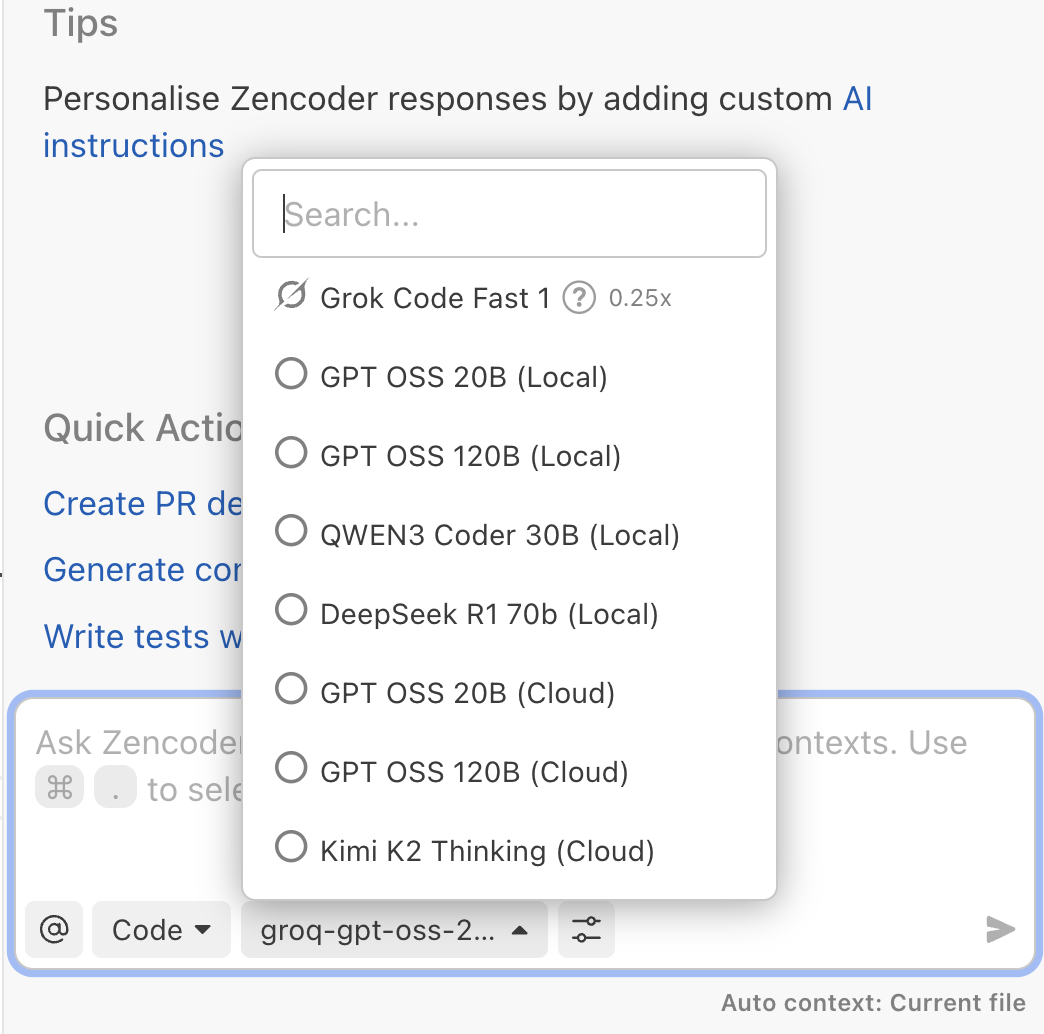
Configure custom models by adding providers to `settings.json`. The same file works globally (`~/.zencoder/settings.json`) or per project (`.zencoder/settings.json`), letting you expose local, VPC, or third-party endpoints right inside the Zencoder model selector.

<img src="https://mintcdn.com/forgoodaiinc/zN5YYrfTXxN7HBxM/images/model-selector-private-config.png?fit=max&auto=format&n=zN5YYrfTXxN7HBxM&q=85&s=28c8d3148d1db3587ce1b09e3c0f0225" alt="Model selector showing BYOM models" width="520" data-path="images/model-selector-private-config.png" />

## Model Definition

Everything—examples, provider lists, reference properties, and troubleshooting—lives inside the JSON structure shown below.

<AccordionGroup>
  <Accordion title="Example settings.json" defaultOpen={false}>
    ```json theme={"system"}
    {
      "providers": {
        "ollama-local": {
          "mode": "direct",
          "type": "openai-compatible",
          "baseUrl": "http://localhost:11434/v1",
          "apiKey": "not-needed",
          "models": {
            "gpt-oss-20b": {
              "name": "gpt-oss:20b",
              "displayName": "GPT OSS 20B (Local)",
              "capabilities": [],
              "options": {
                "temperature": 0.7,
                "maxOutputTokens": 4096
              }
            },
            "gpt-oss-120b": {
              "name": "gpt-oss:120b",
              "displayName": "GPT OSS 120B (Local)",
              "capabilities": [],
              "options": {
                "temperature": 0.7,
                "maxOutputTokens": 4096
              }
            },
            "qwen3-coder-30b": {
              "name": "qwen3-coder:30b",
              "displayName": "QWEN3 Coder 30B (Local)",
              "capabilities": [],
              "options": {
                "temperature": 0.7,
                "maxOutputTokens": 4096
              }
            },
            "deepseek-r1-70b": {
              "name": "deepseek-r1:70b",
              "displayName": "DeepSeek R1 70b (Local)",
              "capabilities": [],
              "options": {
                "temperature": 0.7,
                "maxOutputTokens": 4096
              }
            }
          }
        },
        "ollama-cloud": {
          "mode": "direct",
          "type": "openai-compatible",
          "baseUrl": "https://ollama.com/v1",
          "apiKey": "KEY",
          "models": {
            "gpt-oss-20b-cloud": {
              "name": "gpt-oss:20b",
              "displayName": "GPT OSS 20B (Cloud)",
              "capabilities": [],
              "options": {
                "temperature": 0,
                "maxOutputTokens": 4096
              }
            },
            "gpt-oss-120b-cloud": {
              "name": "gpt-oss:120b",
              "displayName": "GPT OSS 120B (Cloud)",
              "capabilities": [],
              "options": {
                "temperature": 0,
                "maxOutputTokens": 4096
              }
            },
            "kimi-k2-cloud": {
              "name": "kimi-k2-thinking:cloud",
              "displayName": "Kimi K2 Thinking (Cloud)",
              "capabilities": [],
              "options": {
                "temperature": 0,
                "maxOutputTokens": 4096
              }
            }
          }
        }
      }
    }
    ```
  </Accordion>
</AccordionGroup>

### Adding More Providers

Replicate the outer `"providers": { ... }` structure with new keys for each vendor or environment. Mix local runtimes, VPC gateways, and SaaS APIs—Zencoder lists every declared model in the selector.

### Reference

<AccordionGroup>
  <Accordion title="Provider properties">
    <ul>
      <li><code>mode</code> – leave set to <code>direct</code> for BYOM endpoints.</li>
      <li><code>type</code> – <code>openai-compatible</code>, <code>openai</code>, <code>gemini</code>, or <code>anthropic</code> depending on the API surface.</li>
      <li><code>baseUrl</code> – the root URL for the inference API (can be localhost, VPC, or SaaS).</li>
      <li><code>apiKey</code> – inline credential or omit it and rely on <code>ZENCODER\_\<PROVIDER>\_API\_KEY</code>.</li>
    </ul>
  </Accordion>

  <Accordion title="Model properties">
    <ul>
      <li><code>name</code> – the identifier the provider expects in requests.</li>
      <li><code>displayName</code> – friendly label in the model selector.</li>
      <li><code>capabilities</code> – optional list (for example <code>imagesInput</code>) describing special inputs.</li>
      <li><code>options</code> – temperature, max tokens, or other knobs the API supports.</li>
    </ul>
  </Accordion>

  <Accordion title="Top-level flags">
    <p>Set <code>useDefaultProviders</code> to <code>false</code> when you want Zencoder to hide the built-in catalog so the selector only shows the providers you declare. Leave it out (or set to <code>true</code>) to keep Zencoder defaults side by side with your private endpoints.</p>

    ```json theme={"system"}
    {
      "useDefaultProviders": false,
      "providers": {
        "ollama-local": { }
      }
    }
    ```
  </Accordion>
</AccordionGroup>

<Warning>
  If the chat UI returns "<strong>Something went wrong</strong>" after wiring up a provider, email [support@zencoder.ai](mailto:support@zencoder.ai) so we can help troubleshoot the configuration.
</Warning>

## Where to Configure

Use the same JSON schema at either scope depending on how broadly you want to share the providers.

<AccordionGroup>
  <Accordion title="Machine-wide">
    <ol>
      <li>Create or edit <code>\~/.zencoder/settings.json</code>.</li>
      <li>Paste your <code>providers</code> block (plus <code>useDefaultProviders</code> if you need to hide Zencoder-managed models).</li>
      <li>Run <code>zen settings reload</code> so the CLI and UI pick up the changes.</li>
    </ol>

    <p>To avoid storing secrets in the file, export <code>ZENCODER\_\<PROVIDER>\_API\_KEY</code> in your shell and omit <code>apiKey</code> from the JSON.</p>
  </Accordion>

  <Accordion title="Per project">
    <ul>
      <li>Create <code>.zencoder/settings.json</code> inside the repository.</li>
      <li>Commit it so teammates and CI inherit the same provider list.</li>
    </ul>

    <p>Project files override the machine-wide file, so a single repo can target private endpoints even if your global default stays on Managed Cloud.</p>
  </Accordion>
</AccordionGroup>
