> ## Documentation Index
> Fetch the complete documentation index at: https://docs.zencoder.ai/llms.txt
> Use this file to discover all available pages before exploring further.
# Quota Management
> Monitor credit usage, set per-user caps, and manage your organization's quota allocation.
Quota Management gives admins full visibility into credit consumption and control over how credits are distributed across team members.
 ## Credit Overview
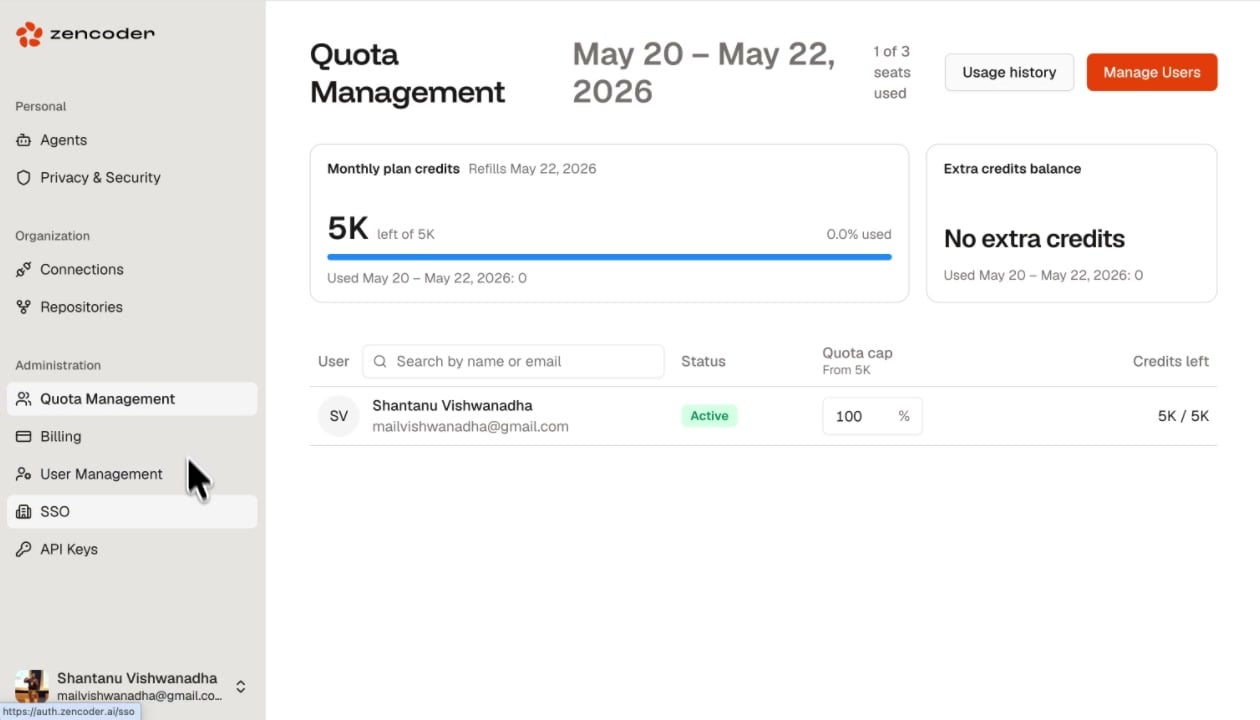
The top section shows two cards:
| Card | Description |
| ------------------------- | ----------------------------------------------------------------------------------- |
| **Monthly plan credits** | Total credits in your plan, how many are left, percentage used, and the refill date |
| **Extra credits balance** | Additional credits purchased beyond the monthly plan allocation |
The billing period and usage window are displayed at the top (e.g., May 20 - May 22, 2026), along with the number of seats used (e.g., 1 of 3 seats used).
## Per-User Quotas
The user table shows each team member with:
| Column | Description |
| ---------------- | ------------------------------------------------------------- |
| **User** | Name and email address |
| **Status** | Active or Inactive |
| **Quota cap** | Percentage of total credits allocated to this user (editable) |
| **Credits left** | Remaining credits for the current billing period |
### Setting Quota Caps
Adjust the **Quota cap** percentage to control how much of the organization's total credits each user can consume. For example, setting a user to 20% on a 5K plan limits them to 1K credits.
## Credit Overview
The top section shows two cards:
| Card | Description |
| ------------------------- | ----------------------------------------------------------------------------------- |
| **Monthly plan credits** | Total credits in your plan, how many are left, percentage used, and the refill date |
| **Extra credits balance** | Additional credits purchased beyond the monthly plan allocation |
The billing period and usage window are displayed at the top (e.g., May 20 - May 22, 2026), along with the number of seats used (e.g., 1 of 3 seats used).
## Per-User Quotas
The user table shows each team member with:
| Column | Description |
| ---------------- | ------------------------------------------------------------- |
| **User** | Name and email address |
| **Status** | Active or Inactive |
| **Quota cap** | Percentage of total credits allocated to this user (editable) |
| **Credits left** | Remaining credits for the current billing period |
### Setting Quota Caps
Adjust the **Quota cap** percentage to control how much of the organization's total credits each user can consume. For example, setting a user to 20% on a 5K plan limits them to 1K credits.
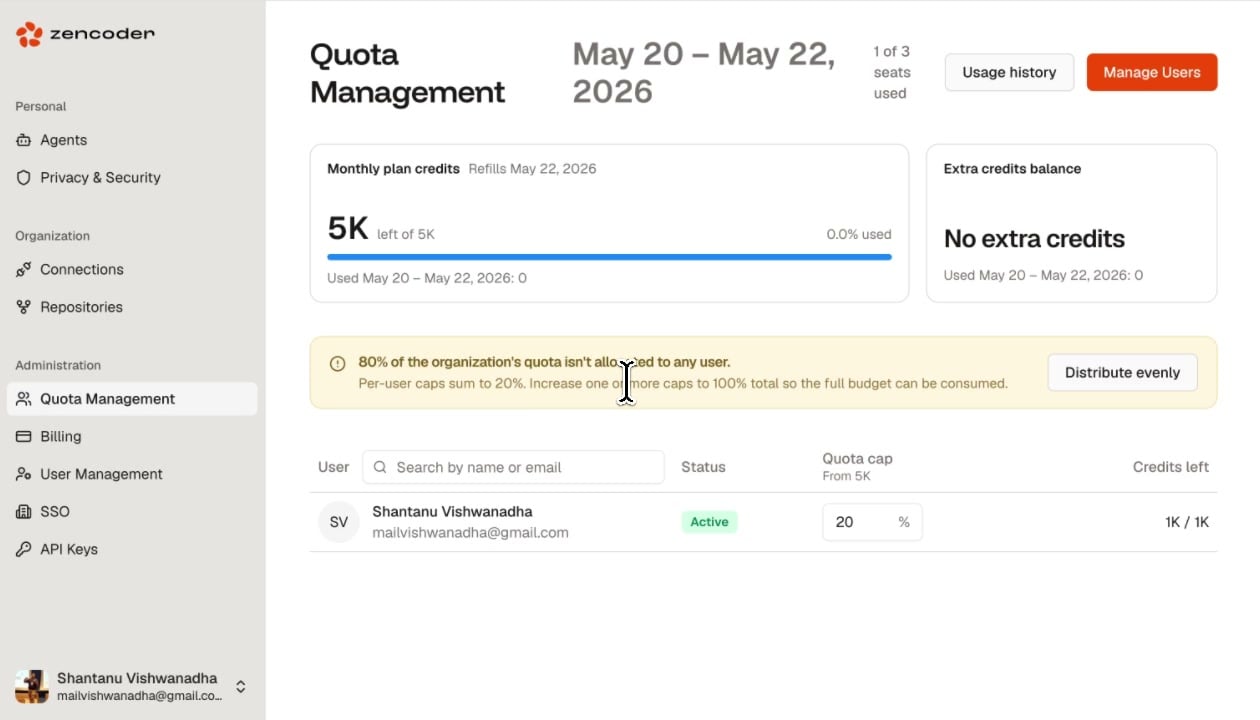 If per-user caps don't sum to 100%, a warning appears: the unallocated portion of your budget won't be consumable. Click **Distribute evenly** to automatically split credits equally across all users.
## Quick Actions
| Button | Description |
| ----------------- | -------------------------------------------------------------------------------------- |
| **Usage history** | View detailed credit consumption history over time |
| **Manage Users** | Jump to the [User Management](/admin/user-management) page to invite or remove members |
If per-user caps don't sum to 100%, a warning appears: the unallocated portion of your budget won't be consumable. Click **Distribute evenly** to automatically split credits equally across all users.
## Quick Actions
| Button | Description |
| ----------------- | -------------------------------------------------------------------------------------- |
| **Usage history** | View detailed credit consumption history over time |
| **Manage Users** | Jump to the [User Management](/admin/user-management) page to invite or remove members |